Starter
For individual teachers and small teams
Capacity
...
student accounts
Annual billing
.../yr
- Up to 0 teacher/admin accounts
- Classes as needed within the student limit.
- Assignments and progress tracking

Track your students' progress, course assignments, and learning all in one place. Setting up an account is quick and free.
Free to start • No credit card required
Built for Schools & Institutions
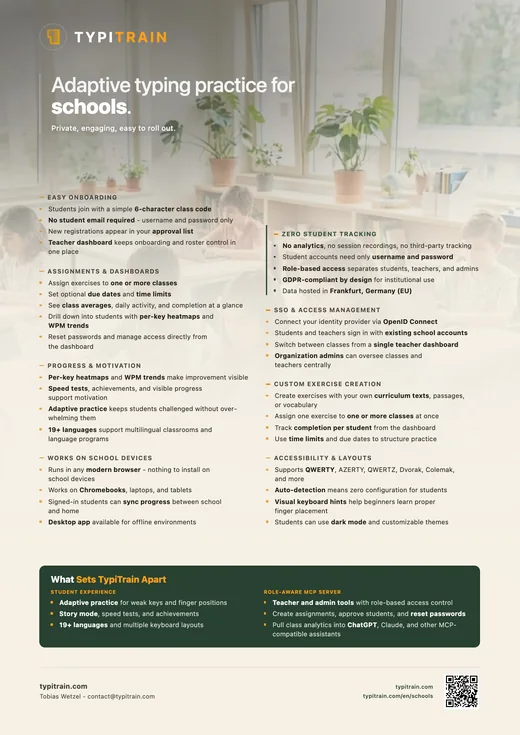
Our school edition is a powerful educational platform designed for schools and districts. Explore a comprehensive typing curriculum with detailed progress tracking and easy class management.
Set up classes quickly, invite students with a join code, and keep approvals, assignments, and progress in one teacher dashboard. TypiTrain is designed to reduce classroom setup friction so students can start practicing right away.
Setting up your school account is quick and easy
Sign up for free and set up your institution profile in just a few clicks.
Create classes, share 6-character join codes, and approve new students when needed.
Assign exercises, track progress, and watch your students improve.
Powerful tools designed for educators to manage classes and track student progress.
See class averages, daily activity, and student-level progress in one dashboard.
Students sign up with a simple 6-character code — no email required. New registrations appear in your approval list so you stay in control of who joins.
Assign exercises to one or more classes with optional due dates and time limits. Track completion per student from your dashboard.
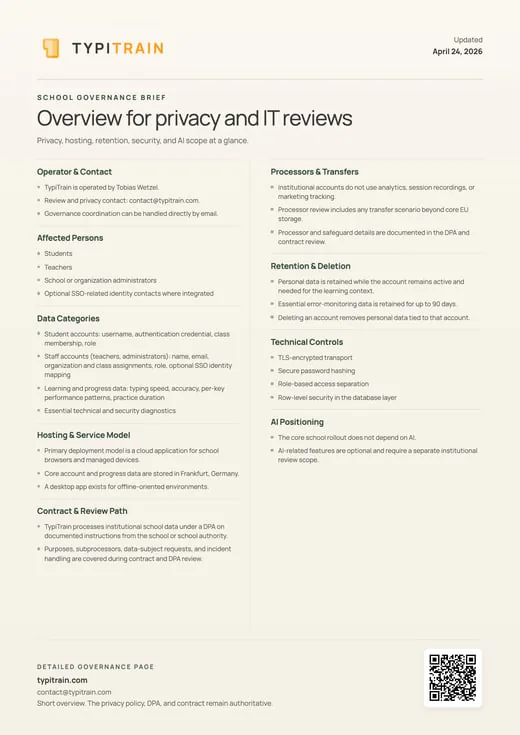
No analytics, no session recordings, no third-party tracking for institutional accounts. Student accounts need only a username and password. Role-based access separates teachers, admins, and students. GDPR-compliant by design.
Connect your school's identity provider via OpenID Connect. Students and teachers sign in with their existing school accounts — no extra passwords to manage.
Create multiple classes, each with its own join code. Approve or remove students, reset passwords, and switch between classes from a single teacher dashboard.
When a student joins with your class code, they appear in a pending list until you approve them. This keeps your roster clean and gives you full control over who has access. Organization admins can oversee all classes and teachers from a central dashboard.
Real-time dashboards show class averages, top performers, and daily activity. Select any student to see per-key accuracy heatmaps, WPM trends over time, and assignment completion rates.
The class overview shows how many students are active today, average WPM across the class, total practice time, and exercises completed. Individual student profiles break performance down to the key level so you can see exactly which keys or finger positions a student struggles with.
Create exercises with your own texts and assign them to specific classes. Set optional due dates and time limits so students practice on your schedule.
Use your own curriculum material, vocabulary lists, or passages as typing exercises. Assign them to one or more classes at once, and the dashboard tracks which students have completed each assignment. Time limits keep practice sessions focused — choose from 5, 10, 15, or 30 minutes per assignment.
TypiTrain supports QWERTY, AZERTY, QWERTZ, Dvorak, Colemak, and many international layouts. Students can choose dark mode, customize themes, and enable visual keyboard hints.
Keyboard layout is auto-detected so students don't need to configure anything. Visual keyboard hints highlight the correct finger and key for beginners, making it easier for younger students to build proper touch typing habits from the start.
Students can practice on Chromebooks, laptops, or tablets. Progress syncs automatically when signed in, so students can start at school and continue at home.
TypiTrain runs in any modern browser — there's nothing to install on school devices. Students who sign in can pick up where they left off on any device. A desktop app is also available for environments where offline practice is needed, with automatic sync when the device reconnects.
The Student Experience
TypiTrain isn't just an admin tool — it's a typing program students actually want to use. Every practice session adapts to the individual student, keeping them challenged without overwhelming them.
Our algorithm analyzes every keystroke and automatically generates exercises that target each student's weakest keys and finger positions. Students who struggle with specific letters get more practice on those letters, while faster typists are pushed with harder combinations.
Students can practice typing in English, German, Spanish, French, Italian, Portuguese, Russian, Chinese, Japanese, Arabic, Korean, and more. Each language comes with its own keyboard layout and localized exercises — ideal for multilingual classrooms and language programs.
Beyond repetitive drills, students can type through short stories, articles, and custom texts. This keeps practice interesting and exposes students to real-world content while they build speed and accuracy.
Students earn badges for reaching milestones — hitting 60 WPM, maintaining 95% accuracy, completing a 7-day practice streak, or finishing their first story. Visible progress and rewards keep students motivated to practice consistently.
Students can take a quick speed test at any time to benchmark their WPM and accuracy. Results are tracked over time so both students and teachers can see improvement.
Students can connect MCP-compatible AI assistants like ChatGPT or Claude to TypiTrain and generate practice texts around their interests or weak keys. This keeps practice personal and relevant without leaving the tools they already use.
MCP & AI
Students can connect MCP-compatible AI assistants like ChatGPT or Claude to TypiTrain and generate practice texts around their interests or weak keys. This keeps practice personal and relevant without leaving the tools they already use.
Comprehensive Learning Tools
Everything your students need to master typing skills, from basic lessons to advanced exercises.
School pricing
Choose a capacity package based on total student accounts. Prices are shown in your local currency when available.
For individual teachers and small teams
Capacity
...
student accounts
Annual billing
For one school or organization
Capacity
...
student accounts
Annual billing
Price
Start free, upgrade when your school is ready
Create an institution account first. Billing stays inside the admin dashboard so only authorized school admins can subscribe.
Everything you need to know about our school edition
Yes! You can create an account and start using all core features for free. There are no hidden costs or credit card requirements.
Each class gets a unique 6-character join code. Students enter the code, create a username and password, and appear in your approval list without needing email verification.
Yes. TypiTrain runs in any modern browser so it works on Chromebooks, laptops, and tablets. Students who sign in can sync their progress across devices automatically. A desktop app is also available for offline practice.
Absolutely. You can create exercises with your own texts and assign them to one or more classes. Each assignment can have an optional due date and a time limit of 5, 10, 15, or 30 minutes.
The class dashboard shows average WPM, accuracy, practice time, assignment completion, and daily activity at a glance. You can drill down into each student to see per-key accuracy heatmaps, speed trends over time, and session history.
Teachers can reset any student's password directly from the class dashboard. Since student accounts don't require email, there's no verification step — you set a new password and the student can log in right away.
Institutional accounts have zero third-party tracking — no analytics, no session recordings, no marketing cookies. We only use Sentry for error monitoring to keep the service running. Student accounts need only a username and password with no email required. Our privacy policy and trackers page detail every service we use.
If you need help getting started, you can reach us by email and we can help your school get set up.
Sign up for a free account today and explore all features. No credit card required.
Create Institution→